

Scoring
Qzzr's personality quiz features two scoring calculation modes.
Your personality quiz can either be a 'projective test' or a 'self-report inventory'.
Scoring is based on a subtle analysis of all of your audience's responses:
- Overall results (e.g. You're a collaborative manager!)
- Attributes (e.g. Responsibility = 65%, Decisiveness = 48%)
Assign points (weighting)
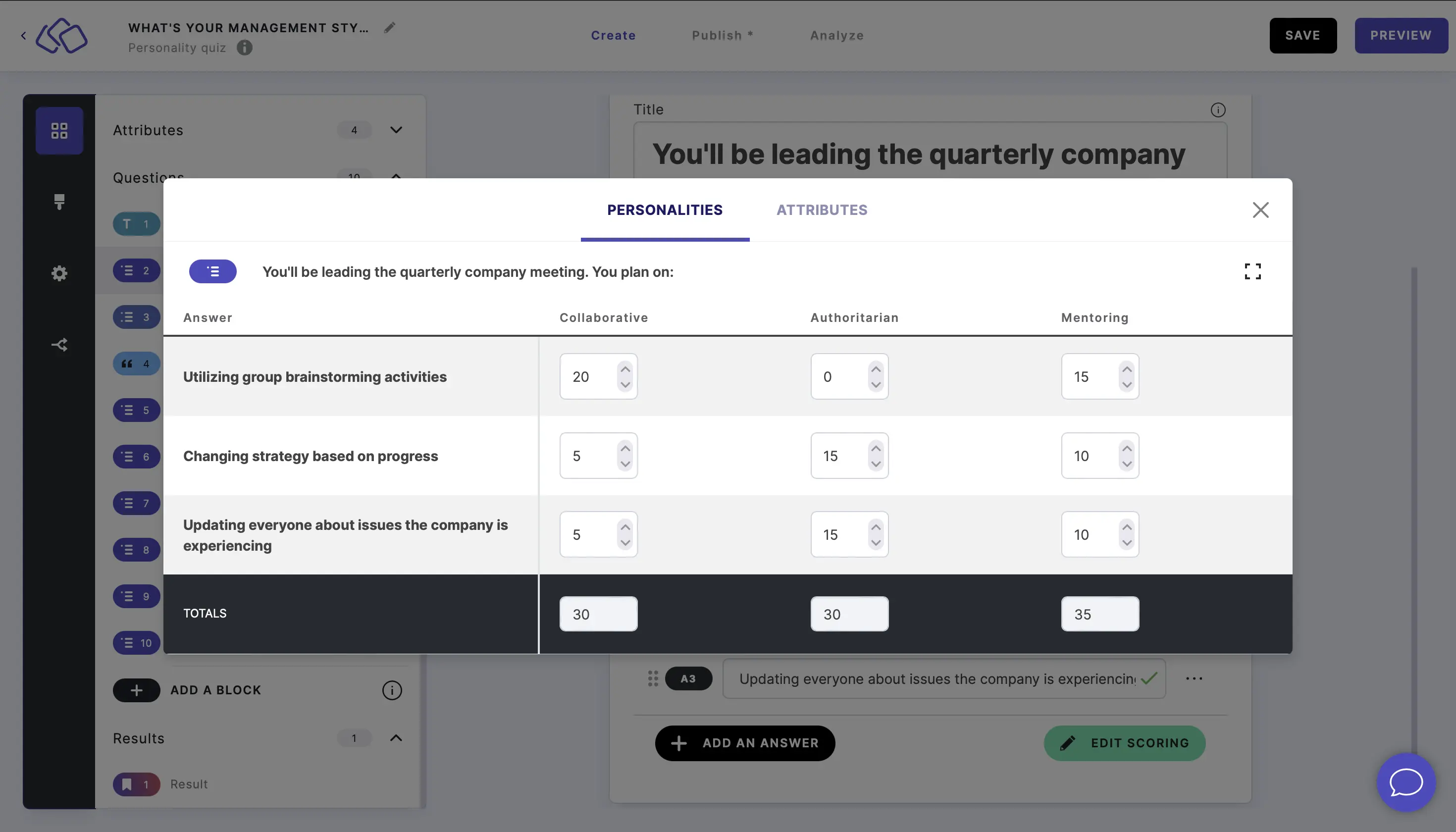
The personality quiz uses a weighted response system, with a range of points from 100 to -100 for each response option.
You assign more points the stronger the association for that response. For example, you could have Paris and Tanzania as results in a 'What is your dream holiday getaway?' quiz.
Imagine the question 'What do you do in your spare time?' had 'Hiking' and 'Fine dining' as answers. For people who answered 'Hiking', you could assign +20 points for 'Tanzania' and +5 points for 'Paris'. For people who answered 'Fine dining', you could assign +20 points for 'Paris' and +8 points for 'Tanzania'.
You can do the same for each question in your personality quiz.
After all the questions, our system adds up the points for all of the responses and gives the audience the particular personality / result with the most points, as well as a set of attributes.
- Click on a single-select or multi-select block.
- Click on EDIT SCORING to open the scoring matrix dialog.
- Use the up and down arrows to adjust the points.
The scoring matrix dialog
The Edit Scoring dialog shows a matrix where rows represent the answers for the current question and columns represent each personality.
- Each cell contains a number input (default: 0) that determines how many points that answer gives to that personality.
- The TOTALS row at the bottom shows the sum of points per personality for the current question.
- The personality with the highest total score across all questions becomes the winning result.
- You can switch the dialog to fullscreen for easier editing with many personalities.
PERSONALITIES and ATTRIBUTES tabs:
The dialog has two tabs:
- PERSONALITIES - assign points from each answer to each personality result.
- ATTRIBUTES (OPTIONAL) - assign points from each answer to each attribute. Attributes are secondary scores shown alongside the winning personality (e.g. "Creativity: 75%, Logic: 42%"). You can define attributes in the personality settings.
Score calculation methods
You can choose from two sorts of result calculations.

Total points achieved across all personalities
Total points are combined across all personalities. Your result is your points divided by this grand total.
- Go to SETTINGS.
- Go to Result calculation based on.
- Select Total points achieved across all personalities.
Max points possible for each result
Each personality has its own total. Your result for a personality is your points divided by that personality's total.
- Go to SETTINGS.
- Go to Result calculation based on.
- Select The max points possible for each personality.